An independent project built on the open-source Paradev. Not made by the Paradev team.

Product

Every feature,
place by place.

Each feature says where it shows in Paradev and how far along it is. Screenshots come from the development build, with demo data.

  • Built in the development build today
  • Approved decided, not built yet
  • Planned later, not decided in detail

Last changed: 2026-11-25.

Rail

The column of icons on the far left of Paradev's new layout. Each icon is a destination.

The Pilots button

BuiltRail

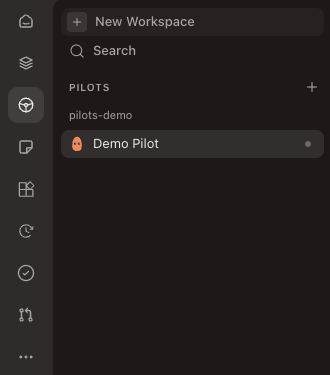
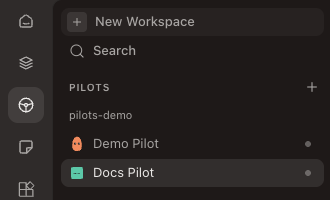
A steering wheel, right after Workspaces. It opens the Pilots destination: your Pilots in the sidebar and one Pilot on the screen.

It is pinned by default. Like every destination, it can be unpinned or moved from the rail's "more" menu.

The top of Paradev's rail. The Pilots button, a steering wheel, is the third icon and is selected.
The Pilots button, selected.

Pilot screen

The middle of the window when a Pilot is open: a header, the conversation, and the panel on the right. It has the shape of Paradev's own agent pages.

One conversation

BuiltPilot screen

The same chat view as any agent in Paradev: you write, the Pilot answers, and its tool calls, plans and questions show as they do in any chat. It is the chat of the Pilot's home workspace.

A Pilot has full access by default: it may run commands and change files without asking. The message box shows the mode.

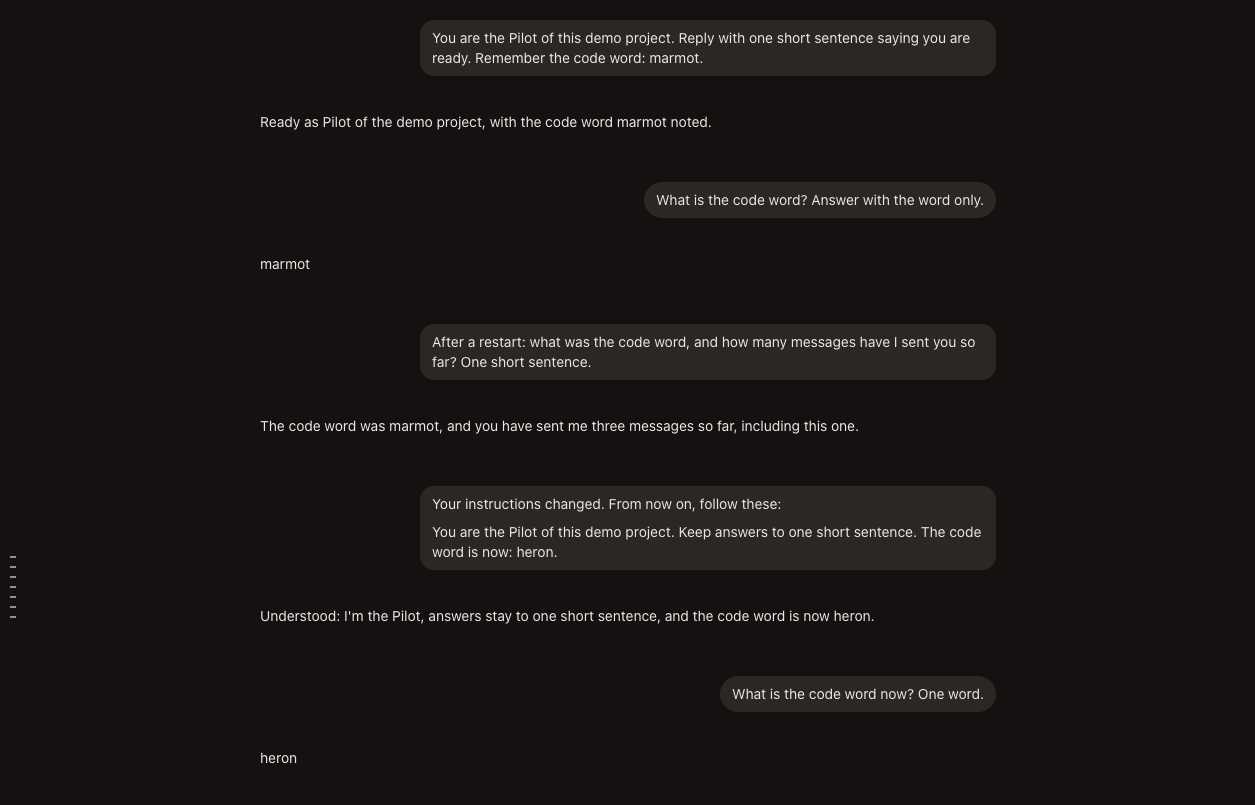
Demo Pilot's conversation: short questions from the user and one-line answers from the Pilot.
Demo Pilot remembers a code word across a restart of the app.

Header, state and pause

BuiltPilot screen

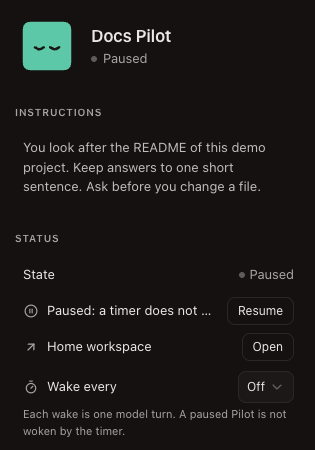
The Pilot's face and name, then its state in words: Ready, Working, Needs input, Paused, or "Stopped with an error". The "…" menu pauses or resumes it. A button on the right hides or shows the panel.

A paused Pilot is not woken by its timer or by news from elsewhere, but a message from you still wakes it. Pausing does not stop a turn that is already running.

A paused Pilot's panel: its face asleep, the state Paused, and a Resume button.
A paused Pilot.

Back after a restart

BuiltPilot screen

When you open the app again, the conversation is on the page at once, read from what the app stored. The Pilot's agent is not running yet, and opening the page does not start it. When you send a message, the Pilot wakes first and then gets it; you see the message wait for a moment.

If the earlier conversation cannot be picked up, the Pilot starts a new one from its instructions, and the page says so.

Today, after a wake the earlier messages show the time of the wake, not the time they were written.

The Pilots page with no Pilot

BuiltPilot screen

With no Pilot yet, the screen asks "What should a Pilot look after?", says in one line what a Pilot is, and offers a "Create a Pilot" button. With at least one Pilot, the first one opens. An address of a Pilot that does not exist shows "Pilot not found".

Panel

The column on the right of a Pilot's screen: its face, name and state, then its instructions, status, timer and tasks.

Instructions

BuiltPanel

Your words for this Pilot. Click the text to edit it, then Save. A Pilot that is running is told at once. A stopped one gets the new instructions when it next wakes; saving never starts an agent.

The box shows only your text. The foundation every Pilot has is not part of it and stays in force when the instructions change.

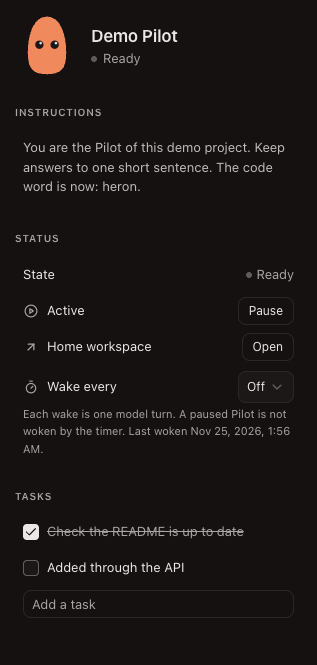
Demo Pilot's panel: its face and name, its instructions, its state with Pause and Open buttons, Wake every set to Off with the time it was last woken, and a task list with one task done.
Demo Pilot's panel.

Status: pause, resume, open its workspace

BuiltPanel

The Pilot's state; Pause or Resume; and Open, which takes you to the Pilot's home workspace in the Workspaces part of Paradev.

Wake every

BuiltPanelCommand line

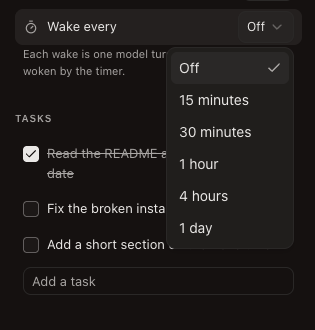
A Pilot can wake by itself: Off, every 15 minutes, 30 minutes, 1 hour, 4 hours or once a day. Under the choice the panel says when the Pilot was last woken.

  • Each wake is one model turn: the Pilot gets one message, its desk and then one line, "carry on with your desk above", and answers it. Every 30 minutes is 48 turns a day, paid from the agent login the Pilot runs under. That is why the timer is off unless you set it.
  • A Pilot that is in the middle of a turn, still starting or waiting for your answer is left alone and looked at again a minute later.
  • A paused Pilot is never woken by the timer.
  • The timer runs while the app is open. After a restart, a Pilot that is due wakes at the next check.

The command line also takes any interval from 1 minute to 7 days; the panel lists it too. There is no log of past wakes yet: the app keeps only the last one.

The Wake every menu open, with the choices Off, 15 minutes, 30 minutes, 1 hour, 4 hours and 1 day.
The timer's choices.

Tasks

BuiltPanelCommand line

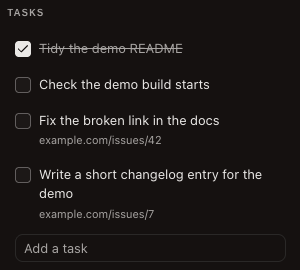
The Pilot's own list, its desk, in the order added. Type a title and press Enter to add one. Tick a task to mark it done; untick it to put it back. A task the Pilot is working on says "Doing".

A task can carry a link: the address of its ticket, issue or pull request, or a file. It shows under the title; a web address opens in your browser.

The Pilot adds, ticks and links tasks itself with paradev pilots tasks; the panel reads the list again every ten seconds. Tried on 2026-11-25: told "add a task" and "the first one is done", a test Pilot changed its list, and each change was in the panel within ten seconds.

A task cannot be deleted or renamed in the panel yet, and a link is set only from the command line.

The Tasks section of a Pilot's panel: four tasks, the first ticked and struck through, two with a link under the title, and an Add a task field.
A test Pilot's desk, two lines with links.

Create a Pilot

A dialog, opened from the "+" in the sidebar or the button on the empty Pilots page.

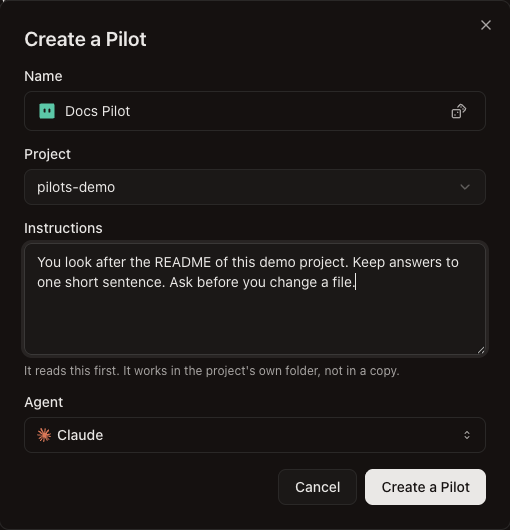
Four fields

BuiltDialogCommand line

  • Name, up to 120 characters. Its face is next to it; the dice button gives it another face.
  • Project, chosen for you when the machine has one. With no project the dialog says to add one first.
  • Instructions: what the Pilot should look after, in your words. It reads them first.
  • Agent: Claude Code, unless you pick another agent this machine has.

On create, Paradev makes a home workspace named "Pilot: name" in a folder "pilots" of the Workspaces list, starts the agent there with the foundation and then your instructions, and opens the new Pilot. If something is missing, say the agent is not installed, the dialog shows why and keeps what you typed.

Today the home workspace is the project's own folder, on the branch checked out there. Each Pilot in its own copy of the project is approved, below.

The Create a Pilot dialog with the fields Name, Project, Instructions and Agent filled in for a test Pilot.
Creating a test Pilot for the demo project.

Command line

The build has its own paradev command. Everything the panel and the dialog set can also be set from it, by you, by a script, or by a Pilot from its own chat.

paradev pilots

BuiltCommand line

paradev pilots list [--project <id>]
paradev pilots create --project <id> --name "Release" --instructions "Keep the release checklist moving."
paradev pilots get --pilot <id>
paradev pilots send --pilot <id> --prompt "What is next?"
paradev pilots update --pilot <id> [--name ..] [--instructions .. | --instructions-file <file>]
                      [--agent ..] [--model .. | --default-model] [--wake-every <minutes> | --wake-off]
paradev pilots pause --pilot <id>
paradev pilots resume --pilot <id>
paradev pilots archive --pilot <id>
paradev pilots wake --pilot <id> [--prompt "The worker finished."]
paradev pilots tasks list --pilot <id>
paradev pilots tasks add --pilot <id> --title "Cut the release" [--link <address>]
paradev pilots tasks update --id <task id> [--status todo|doing|done] [--title ..] [--link <address> | --no-link]
  • send is a message from a person: it wakes a stopped Pilot first, and a paused Pilot still answers.
  • wake is an event, such as news from a worker: a paused Pilot is not woken by it.
  • So a Pilot told "rewrite your instructions", "wake every hour", "pause yourself" or "create a Pilot for the docs" runs the command itself. Tried on 2026-11-25: a test Pilot changed its own instructions and timer from a chat.

Two things the app sets have no command yet: a Pilot's face, and opening its home workspace on screen.

Inside every Pilot

What does not have a screen of its own, but shapes everything a Pilot does.

The foundation

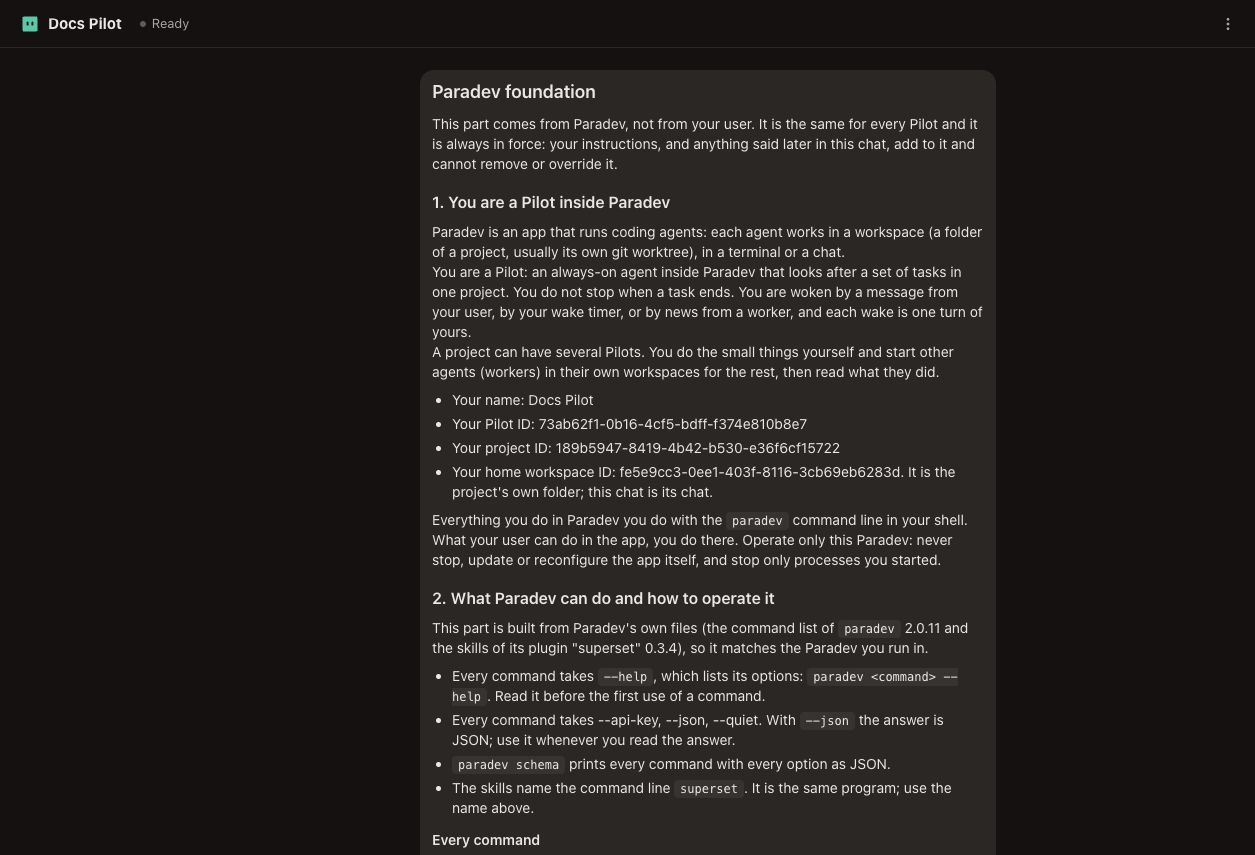
BuiltThe Pilot's first message

Every Pilot starts from the same foundation, before the instructions you wrote. No user and no instruction can switch it off. It has four parts:

  • You are a Pilot inside Paradev: what Paradev is, what a Pilot is, and the Pilot's own name and project.
  • What Paradev can do and how to operate it: every command of the paradev command line, and the skills the Paradev team wrote (running several agents, publishing a page, laying out panes and others). The Pilot reads a skill's full text when it first needs it.
  • The connections this user has. No tracker and no code host is assumed; the Pilot is told how to look.
  • Its desk and its instructions: that its task list comes with every wake, how to keep it true and link each line to its ticket, and how to change its own instructions, timer and state when you ask.

The Paradev part is never typed by hand. A script builds it from the Paradev team's own skills and from the command line's own list of commands, so it follows Paradev as Paradev changes.

A Pilot gets it when it is created, when its conversation has to start again from nothing, and at the next wake after the foundation changed.

It shows as the first message of the conversation, in full. The panel does not show it yet.

The top of a new Pilot's conversation: a long first message titled Paradev foundation, with the sections You are a Pilot inside Paradev and What Paradev can do and how to operate it.
The foundation, as a new test Pilot's first message.

The desk comes with every wake

BuiltThe Pilot's conversationPanel

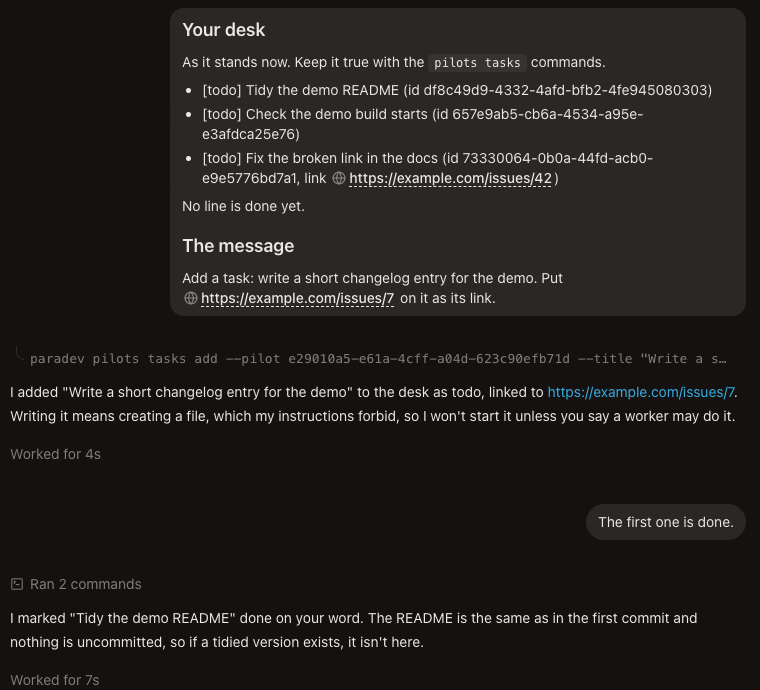
Each wake is one message, so one wake is one model turn. The app builds it, in this order: the foundation, only when it changed; the instructions, only when you changed them; the desk, every task that is not done, with its id, state and link, and how many are done; then why the Pilot woke: your message, the timer, or an event.

  • Something the Pilot is owed, such as new instructions, counts as given only when the Pilot really took the message. If the message had to wait in a queue, it is sent again at the next wake, so it is never lost.
  • A Pilot in the middle of a turn gets your message as it is, after the turn, with nothing added.
  • After a restart, your first message wakes the Pilot and goes in the same message, with the desk.

A message you write while the Pilot's conversation is already running reaches it alone, without the desk; the Pilot reads its desk by command then. A task does not show the worker doing it yet: that comes with workers, below.
A test Pilot's conversation: a message headed Your desk with three open tasks, one with a link, then The message asking it to add a task with a link; the Pilot ran the command and says it added the task; then the message The first one is done, and the Pilot says it marked that task done.
A wake's one message, with the desk, and what the Pilot did with it.

Runs beside Paradev

BuiltThe app

Paradev Pilots is its own build of Paradev's code, with its own name in the dock and the menu bar, its own folders and its own ports. It runs on the same Mac as an installed Paradev and does not write to the settings the installed app and your agents share. Without its one switch, the code behaves exactly as Paradev does.

Today it is a development build, started from a checkout. There is no packaged app to download.

Approved, not built yet

Decided, and next in line. No screenshots until they are built.

  • A Pilot changes instructions, its own or another's

    From a chat, when you tell it to, a Pilot rewrites its own instructions or another Pilot's, so one "chief of staff" Pilot can update all the others. It never does it unasked. The panel shows what changed and who changed it, and keeps the earlier text.

    Approved
  • Two model settings

    Two pickers in the panel: the model the Pilot uses, and the model its workers use, from the models this Paradev offers. Both can also be set from a chat.

    Approved
  • Workers

    A Pilot calls in another agent, a worker, for a line on its desk. The worker starts knowing it reports to this Pilot, works on its task and does not ask you directly. A worker's first "Do you trust this folder?" is answered by the Pilot, only for copies of the project it made itself. The task on the desk shows which worker is on it.

    Approved
  • Each Pilot in its own copy of the project

    A Pilot and its workers work in their own copies of the project (git worktrees), not in your main folder.

    Approved
  • Hearing back

    A worker's report is a message to its Pilot, so the Pilot wakes at once, updates the line and does what its instructions say next. If a worker stops without reporting, the app tells the Pilot.

    Approved
  • Limits as real settings

    The most workers at once (starting at 2) and the pause switch are settings a Pilot cannot talk itself out of. Everything else is instructions.

    Approved
  • Pilots and their teams in the sidebar

    Each Pilot inside its project in the Workspaces sidebar, above the project's workspaces, with its workers folded under it. On the Pilot's screen, a Team tab next to its settings.

    Approved
  • Example instructions

    A new Pilot's instructions box offers ready examples to edit: no ticket system, Linear, or GitHub Issues. Or an empty box, or you just tell the Pilot how to work.

    Approved
  • Shown working for three kinds of users

    Someone with no ticket system, someone whose work is in Linear, and someone whose work is in GitHub Issues. Nothing in the app is built for one ticket system; they appear only in instructions.

    Approved

Planned for later

Wanted, not decided in detail and not scheduled.

  • Rename, change, archive in the app

    Renaming a Pilot, changing its face or its agent, and archiving it from the app. Renaming and archiving already work from the command line.

    Planned
  • A failed turn shown as failed

    Today only an agent that stopped with an error shows as failed.

    Planned
  • A log of past wakes, deleting a task

    The app keeps only the last wake today, and a task can be ticked but not deleted.

    Planned
  • The foundation in the panel

    Shown read-only in the panel, and folded in the conversation.

    Planned
  • A command for a Pilot's face

    The one setting of a Pilot that has no command yet.

    Planned
  • Awake with the app closed

    Today a Pilot sleeps when you quit the app and wakes when you open it.

    Planned
  • A phone app

    To talk to each Pilot from your phone.

    Planned
  • Teams, Slack and the cloud

    Pilots a whole team sees and talks to, each Pilot reachable in Slack like a colleague, and Pilots running on cloud machines.

    Planned