Give each project
a Pilot.
A Pilot is an agent that stays with one project. You give it a name and instructions once. It keeps its own task list, wakes when you write or on a timer, and keeps one conversation that survives a restart of the app.
Pilots live inside Paradev, the open-source Mac app for running coding agents. This site shows what is built today, what is decided next, and where each part shows in the app.
What it is
One agent per project, always on.
If you run several coding agents across several projects, most of your day is keeping track: which agent is on what, what is left to do, what changed while you were away. A Pilot does that for one project.
A project can have several Pilots, one for releases and one for the docs, say. Each has a face, a name, written instructions and a single conversation that you can pick up at any time. A Pilot may run commands and change files without asking, like any agent you give full access to in Paradev.
Everything a Pilot's panel can set also has a command, so a Pilot can set itself up from a chat: tell it "wake every hour" or "rewrite your instructions", and it runs the command itself.
Where it shows
Five places in Paradev.
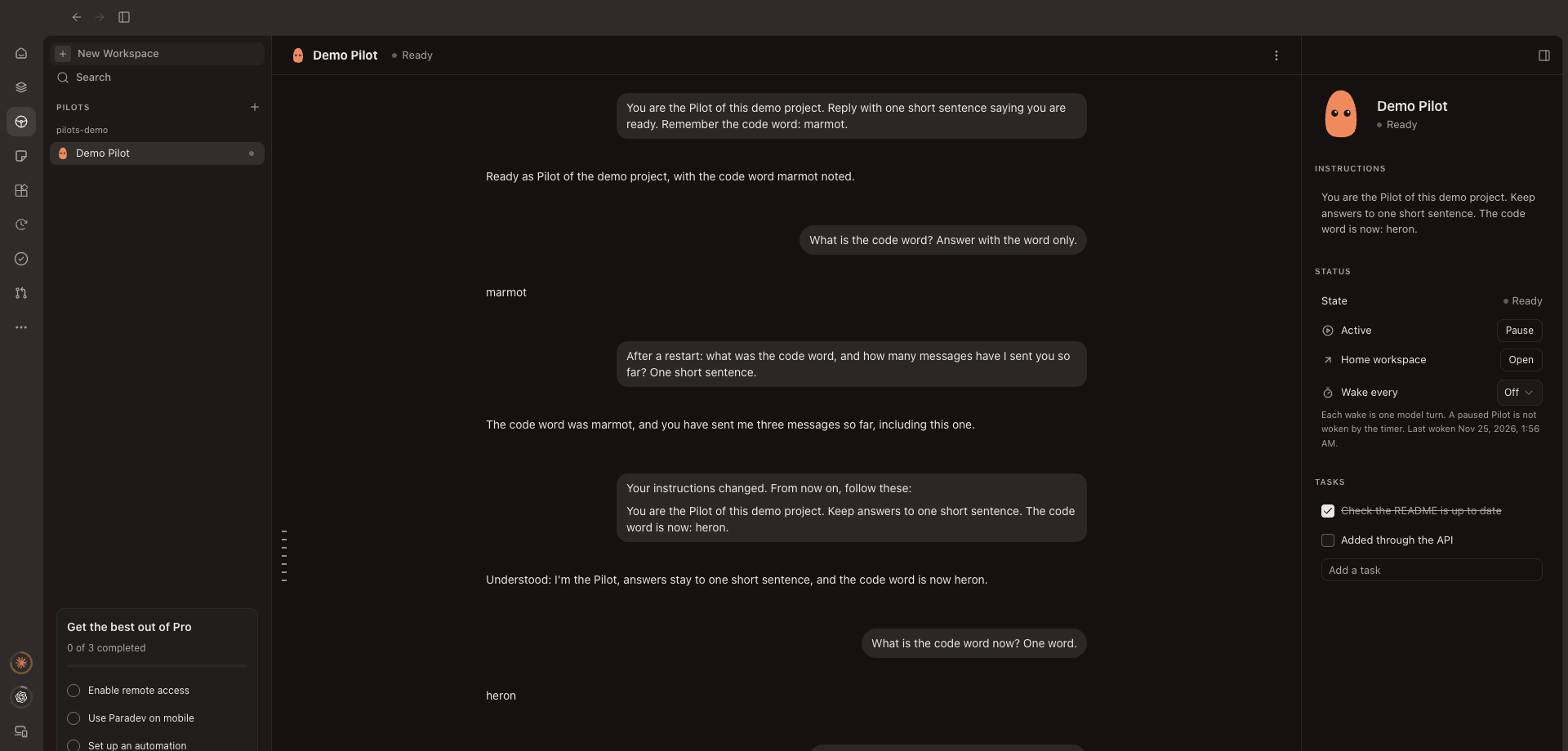
Pilots use Paradev's new layout: an icon rail, a sidebar, the screen in the middle and a panel on the right. Nothing of Paradev is replaced; Pilots add one destination. The numbers match the picture at the top.
- 1The rail.
A Pilots button, a steering wheel, right after Workspaces. Pinned by default; it can be moved or unpinned like any destination.
- 3The Pilot's screen.
Its conversation, the same chat view as any agent in Paradev, with its state and a pause menu in the header.
- 4The panel.
Its instructions, its state, the wake timer and its task list. Edit any of them in place.
- 5The command line.
paradev pilotsdoes everything the panel does, for you, for scripts and for other agents, the Pilots included.
What a Pilot is made of
Three layers.
The foundation
The same for every Pilot, and no instruction can switch it off: you are a Pilot inside Paradev, here is what Paradev can do and every command to operate it, here is how to find the connections this user has, and here is how to keep your task list. Its Paradev part is built from the skills and the command list the Paradev team wrote, so it follows Paradev as Paradev changes.
The instructions
Your words: what this Pilot looks after, where its work comes from, when it should ask you. They sit in the panel, and you can change them at any time.
The tasks
The Pilot's desk: what it is busy with. You add lines in the panel; the Pilot adds and ticks them itself from the command line. Your ticket system, if you have one, stays outside the app; a Pilot reaches it only if its instructions say so.
Where it stands
Working today, decided next.
Built
- Create a Pilot for a project, talk to it, pause it.
- The conversation is back after the app restarts; your next message wakes the Pilot.
- A wake timer, from every 15 minutes to once a day.
- A task list you and the Pilot both keep.
- The foundation, in every Pilot's first message.
- A command for everything the panel does.
Approved
- The Pilot sees its task list at every wake and keeps it itself.
- Workers: the Pilot calls in other agents for its tasks, each in its own copy of the project, and hears back when they finish.
- A Pilot changes its own instructions, or another Pilot's, when you tell it to, with the earlier text kept.
- Pilots inside their project in the sidebar, their workers folded under them.
Paradev Pilots runs as a development build. It is not available to download yet.
Built on Paradev
Paradev, plus Pilots.
Paradev is an open-source workspace for Claude Code, Codex and other coding agents: each agent works on its own branch, and you review their changes in one app. Its code is public on GitHub under the MIT license.
Paradev Pilots is a separate build of that code with Pilots added. It has its own name, its own folders and its own ports, so it runs beside an installed Paradev and leaves it as it is. Pilots follow the look of Paradev's new layout, so they feel like part of the app.